
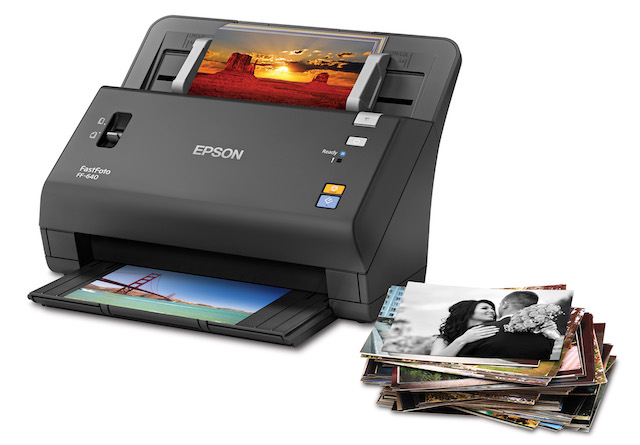
As a new parent, you know how your collection of photos just explodes. It’s suddenly time to buy a new laptop and upgrade to a phone with the maximum storage available. And despite all the headaches new photo storage entails, it’s certainly a lot better than the “good old days” when baby photos filled shoeboxes rarely to be seen. Additionally, in the olden days of just 15 years ago, photos were often destroyed in natural disasters and fires with no possible source of backup.
It’s now been about 15 years since the widespread adoption of digital cameras, so depending on how old your kids are, you may not have any photos in hard copy of your little darlings. Our kids are 12 and 16, and we only have a year or two of printed baby photos around. However, for anyone over 20, there is still all that pre-digital history, including albums handed down through the generations and old sleeves of Kodak-developed pictures from Instamatics and fancy SLRs. If you have a lot of those, you may have already gone to photo scanning services to get boxes of photos scanned and put on CD-ROM and now DVD. If you have, you likely know the issues with these services:
- You send your precious memories out and can’t really be sure they are in process or lost at sea. I used one service where I finally contacted them 6 weeks later because I was worried I’d lost my most prized photos. The online services have also gone through a lot of failures and consolidations and some people have lost their photos during the merging or sales of operations.
- Scanned photos are never organized by date or subject so when you import them into an app like Apple Photos, you suddenly have a lot of photos from 1988 showing up as October 2016. These scanning services scan quickly and have no time to organize and tag your photos.
- Photo services can’t guarantee the orientation of the photos, so be ready to spend a lot of time changing photos from landscape to portrait.
- If you have many photos, it does get expensive very fast unless you only do very small quantities. That’s why they usually draw you in with a $40 “box” of 200 photos. But what happens to all the rest of the stuff you have?
Epson now has created a scanner that allows you to quickly scan all the photos in your house, eliminating most of these drawbacks. At $650 on Amazon, the Epson FastFoto FF-640 scanner does not come cheap but it does everything it says it will do very efficiently.
The Epson FastFoto promises to help you make JPGs of your old photos very fast and of very good quality. Both are true.
Ease of use
We found setup to be very easy. We first installed the FastFoto scanner software which was pretty straightforward though did involve some updates. Setup of the scanner took just seconds after removing packing materials and we were ready to get going.
I started with some partially faded photos from the 70’s that were in an odd 3.5X4.5 inch size. Using the Epson application, I was prompted to describe my photos and made few entries to establish the year and month (I could have chosen season as well). I also added a subject to create a subfolder. I clicked “start scanning” and as promised, the photos zipped through at 1 per second making quick work of the project. The scanner scans at 30 at a time, but if you have the photos ready, as soon as one scan is finished, you’re asked if you want to add more without having to re-enter your settings. Epson bills this as the world’s fastest scanner (at 300 DPI). I have no reason to doubt them.
The scanner only has 3 buttons and 2 switches. One switch actually just allows you to open the scanner to fix any blockages. The second switch toggles between two levels of thickness. I used what I call “thin” for photos and “thick” for postcards. The buttons are just as direct: ON/OFF, Scan, and cancel. I like stuff this easy.
Scan quality
You can choose to do scans in 300 or 600 DPI, depending on whether you’ll need to later blow them up or crop them. I found 300 DPI was fine for old pictures shot with a 110 cartridge camera from the 70’s where the pictures were already grainy. If you have the space, Epson recommends scanning everything at 600 DPI since you never know when you might need an enlargement or poster-sized version of any of your photos.
Automatic photo enhancing:
The FastFoto will also enhance your photos on the fly, removing another tiresome step. In our testing, I found this great for removing yellowing of postcards from the 70’s. In the example below you can see the yellowing on an old postcard and how the application made the borders less yellow without taking away from the original image.
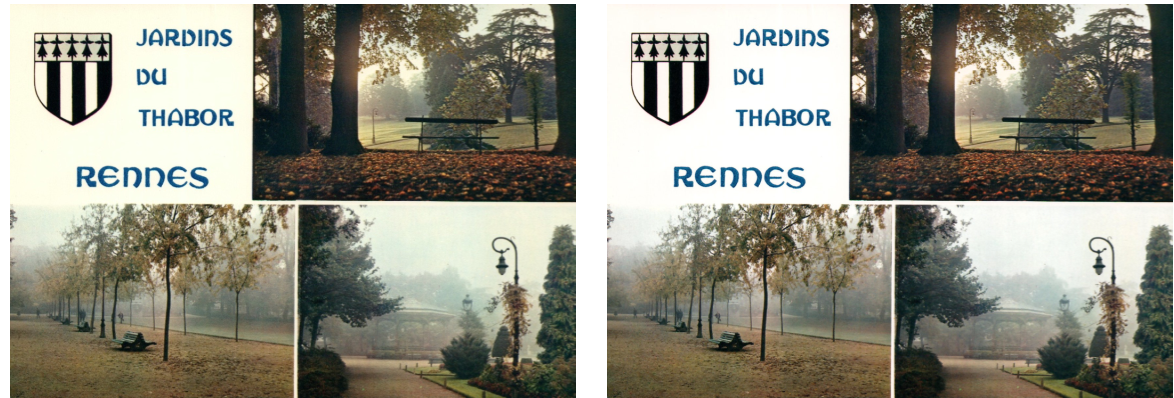
I wondered whether Apple Photos would do a better job. The image on the left in this example is what the Photos app did to enhance the original image. Apple Photos brought out more magic in the colors, but the yellowing was untouched. In the example on the right, I had Apple Photos “enhance” the original which was already enhanced by FastFoto. In this case, you get reduced yellowing PLUS brighter colors. Bottom line: FastFoto will be good enough for most enhancing but for special photos, you still may want to go in and play with them in your photo editing software.
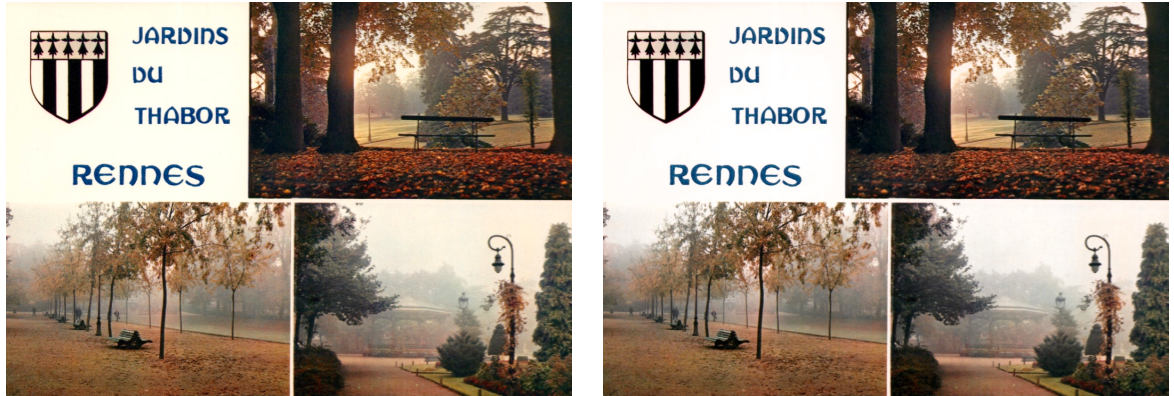
FastFoto has an option (recommended) to save your original and their enhancement which can also correct specifically for fading and redeye. The original is saved as 000.jpg and the enhanced as 000a.jpg. FastFoto will also scan the back of your photo for ultimate in record-keeping. That info is stored as 000b.jpg so it will sit right next to your original for reference.
Other scanning uses
FastFoto makes it easy to not only scan old photos but if you have them, old postcards as well. A setting on the scanner just adjusts for the added thickness. I have a collection of old holiday cards from family and friends my wife has been asking me to throw out forever. As a veteran packrat, I know that the minute you throw something away, its value becomes apparent. Now, with FastFoto, I finally have a use for all those old photos. In literally just a few minutes, I’m going to scan 15 years of holiday card photos and make a slideshow I can project on the wall during our holiday party.
You have to hand it to the product guys and gals at Epson. They realized that by making this job easy, the FastFoto may not get much use beyond a very productive Sunday afternoon. So they also bundled other scanning software with the photo scanning software. This has two advantages:
- It makes the photo scanning application very easy, with few distractions or options. It’s set up to do one thing and it does it very simply
- The FastFoto then can be used as a home document scanner for complete scanning as well as OCR of different size documents. A simple switch in the FastFoto software changes the SCAN button on the scanner to activate the document scanner instead of photo scanning. It’s just as easy to change it back.
Once you have the scanner, you’ll be overwhelmed by how many photos and postcards could be scanned and archived. I started with a small stack and couldn’t stop. Soon my wife was getting on me about the mess I had spread across the dining room table. Let’s be clear, the FastFoto makes a hard job doable, but it does not do the work for you. The Epson engineer I talked to related a story of scanning 10 plastic bins full of thousands of photos during one Saturday afternoon. Dream on! You very quickly realize that photos come in all sizes and are often mixed for one major event depending how many photographers were going at it. Go back 50 years, and prints came in lots of weird sizes. Epson has made this job a LOT easier but if you’re the type to really get into a project, you’ll find a lot of permutations to adjust to. That’s not Epson’s fault but make sure you have mental space for the job ahead.
At $649.99, the Epson FastFoto scanner will not be for everyone. It will, however be cheaper and less anxiety-producing than sending your photos by mail to some outsourced scanning facility who-knows-where. My recommendation though is to see if you can buy it with a few other family members and split the cost. Everyone has old photos and albums that they would hate to lose. After your family member’s safety, it’s the first thing people worry about when they imagine a fire or storm destroying their home. The Epson FastFoto, coupled with cloud storage, is a way to at least remove at least this one source of anxiety.
