
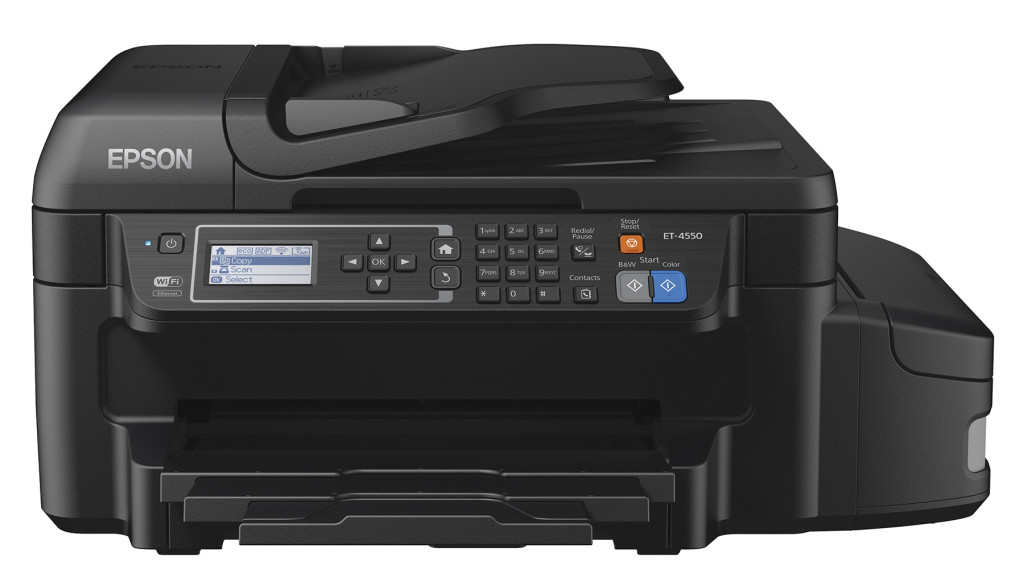
Epson Workforce Ecotank 4550 All-in-one Printer
We love our Epson Workforce printer with reloadable ink cartridges!
I’ve been using the Epson Workforce ET-4550 for about six months after Epson sent us a machine to try out. It’s taken me a while to write a review because I wanted to see how fast the ink ran out and if the printing was consistent day in, day out. I also wanted to use it long enough so I could find those issues that bother you at first but then fade away, and more importantly the ones that are minor irritants but over time become major bugaboos.
As a dad of middle school and high school teens, we do a lot of printing. I was tired of nagging kids not to print too much because of the steep cost of print cartridges and how fast they seem to go out, rendering all printer functions useless, including scan or b&w copying. While I try to be a attentive dad, the calls to run down to my home office to receive an email with their document so I could print it for them, was getting tiring. The Epson Workforce promised to make these issues magically disappear, and so they did. While the Workforce is not perfect in every way, it is a darn good printer.
Let’s discuss this in order:
1. Setup – The Epson was easy to take out of the box and set up. Like any other printer, the Workforce requires a special printer USB cable (not included) and it was easy to find space on my desk given the Workforce’s small footprint. As you might imagine, setting up the ink cartridges was what took some time and orientation. Epson had sent me gloves to wear which I was too pig-headed to wear, but I also like to test things more the way an ordinary consumer would. Like most men, I don’t go looking for protective gear before getting down to business. Pouring ink and filling all cartridges took a bit of time but was straightforward. Once completed, I felt like I had that task done for a while, though each time I turn on the machine, I get a warning to “check ink levels.”
2. Ease of use – It was easy to add paper to the one the paper slot and get started. Connection to my computer was easy at first through USB, and then with a simple connection to my home Wi-Fi. With those two options set, i’ve been able to print from my computer, as well as my iPhone and iPad. This is the family’s first wireless printer and the kids love printing their homework assignments without having to send them to me first through email. The kids also think it’s super cool that the printer can do two-sided printing without reinserting the paper. At the same time, we’ve been slightly disappointed there isn’t a second paper tray for different paper sizes. Additionally, a single paper tray is relatively small and needs to be refilled often. There is no manual paper insert, so if you’re printing an envelope, for example, you have to replace the paper in the paper tray.
The Workforce prints very fast at 7.3 pages per minute, but importantly, there is little latency after you push “print.”
3. Print quality – Print quality is not the same as the laser printer. With laser printers, output tends to be more saturated and darker, and some prefer that look. The prints from the Epson WorkForce ET-4550 EcoTank are not as saturated and have a somewhat wet look but the effect is very clear. After you see a few pages, you actually quit noticing the difference. However, don’t expect that Pro printer look you might expect if you had send your document out to be printed. You can get better results using better paper but regular paper will have this effect.
4. Scanning – Like most recent printers, the Epson has buttons to copy and scan right from the dashboard of the Workforce itself. “Copy” is pretty dependable and with one or two buttons you can choose to copy in B&W or in color. However I’ve had mixed results with scanning. It appears scanning is only done with a wired connection. Pushing the “Scan” button on the Workforce opens a Scanner window on the laptop allowing me to then change settings and destination for the scanned file. While this isn’t exactly “one button” scanning, I don’t see how it can be avoided. Epson also has created a cloud-based scanning ability, but I did not try this function.
Pros:
- No ink cartridges! This of course, is the biggest benefit of the Epson Workforce printers.
- Easy to set up and use over wired USB, ethernet or WIFI
- Far more economical than ink jet or laser jet printers.
- Scanner, fax and print r functions do not quit working if you run out of ink
- Very fast printing
- 2-sided printing
Cons:
- Only one paper slot. No manual paper slot so you must remove paper to print odd-sized shapes like envelopes.
- Print quality differs from Laser Jet though this may be unnoticeable to readers.
I’d highly recommend this scanner for families or home office where you need to print out a lot of copies efficiently. The idea of refillable tanks is a game-changer for this industry.
GreatDad.com Review Policy: The featured product for this review was provided to us, at no cost, by the manufacturer or representing PR agency for the sole purpose of product testing. We do not accept monetary compensation for reviewing or writing about products. We only review products that we have personally tested and used in our own homes, and all opinions expressed are our own.

Leave a Reply
You must be logged in to post a comment.